

The WordPress Japanese Keyword Hack
A GTA web design agency — a company actively selling WordPress websites to small businesses — recently had their own domain indexed with hundreds of Japanese e-commerce product pages. Toshiba washing machines. Japanese consumer goods. Thousands of spam URLs, all hosted under their .ca domain, all indexed by Google.
They had no idea.
This is the WordPress Japanese keyword hack, and it is one of the most damaging and invisible forms of site compromise on the internet.
What It Looks Like
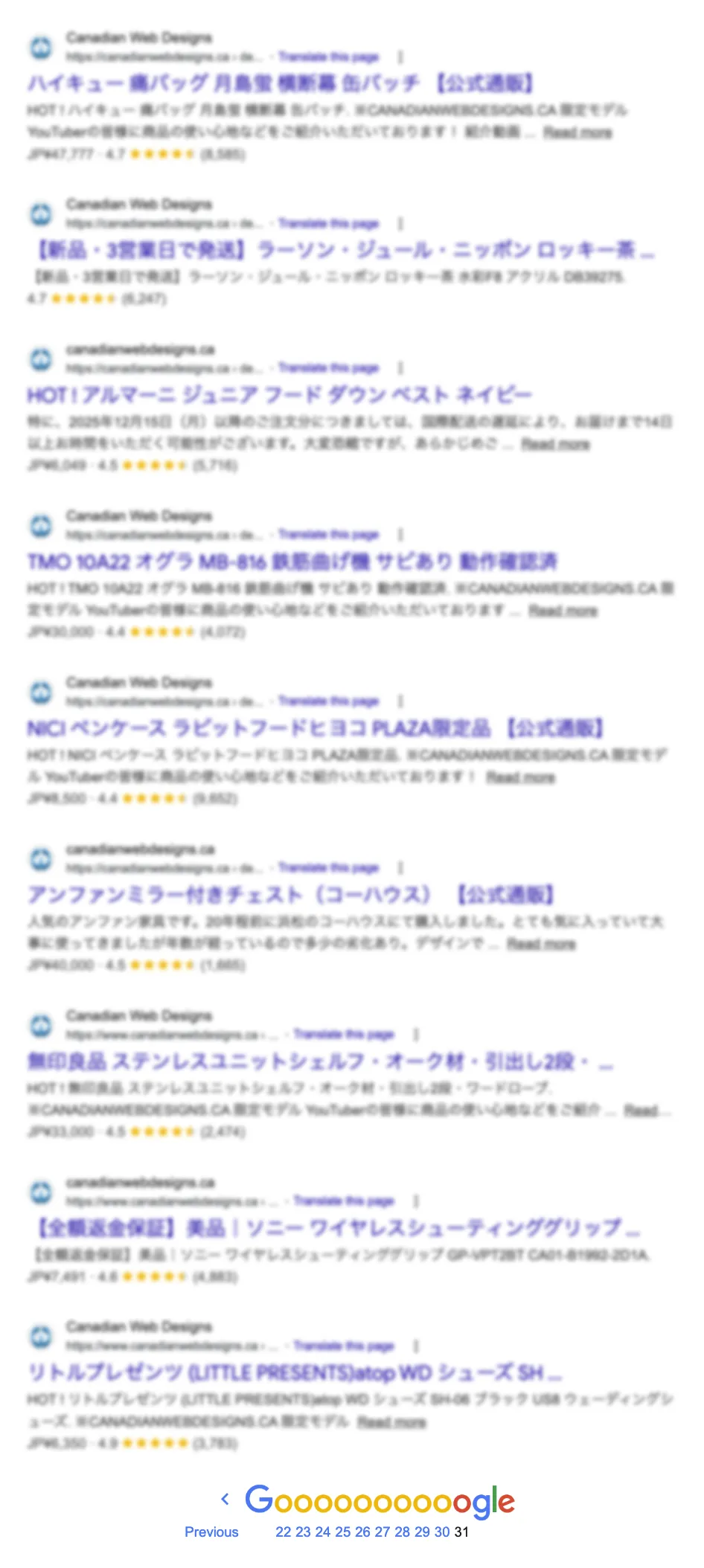
Run a site:yourdomain.com search in Google. If your site has been compromised this way, you will see results that look nothing like your website — foreign language product listings, e-commerce pages, casino content, or pharmaceutical spam indexed under your domain. The URLs follow a pattern: long, random-looking paths like /items/U774074515/ that resolve to 404 errors when clicked, or load spam content that only Google’s crawler sees.
The site owner sees their normal homepage. The web designer sees their normal admin panel. Google sees thousands of spam pages injected into the site’s indexable URL space. The mismatch is the attack — the spam content is served only to crawlers, not to logged-in users or direct visitors.
How It Happens
The Japanese keyword hack is almost always a WordPress vulnerability, exploited through:
- Outdated plugins — a plugin with a known security flaw that was never updated. The attacker exploits the flaw to inject files or database records
- Nulled themes or plugins — pirated WordPress software that ships with backdoors built in
- Weak admin credentials — brute-forced login granting direct access to the file system
- Abandoned or forgotten WordPress installations — a staging site, an old subdomain, a client’s site the designer stopped maintaining
Once in, attackers inject thousands of pages into the WordPress database or add PHP files that generate spam content dynamically. The pages are cloaked — they return 200 status to Googlebot while showing 404 or redirecting human visitors. Google indexes the spam. The site owner’s domain authority bleeds into spam content for months or years.
Why It Goes Undetected
The contractor or business owner never sees the spam pages — they look at their own site and everything appears normal. The web designer who manages the site is not monitoring Google’s index. Neither of them runs a site: search. Search Console shows the errors, but no one is checking Search Console.
By the time anyone notices — if they ever do — Google has crawled and cached thousands of spam URLs under the domain. Ranking for legitimate services drops. Domain trust erodes. Recovery requires cleaning the injected content, removing it from Google’s index, and waiting months for the damage to reverse.
How to Check Your Own Site
Run this search in Google:
site:yourdomain.comWhat you should see: your service pages, your contact page, your blog posts.
What indicates a problem:
- Pages in Japanese, Chinese, Russian, or other languages you did not write
- Product listings for goods you do not sell
- Hundreds or thousands of indexed pages when your site has fewer than 50
- URLs with random strings:
/items/,/products/, long alphanumeric paths
Also check Google Search Console → Coverage → Excluded. A large number of “Crawled — currently not indexed” or “404” URLs at unusual paths is a secondary signal.
What Recovery Looks Like
- Identify the entry point — review WordPress file modification dates, check plugin changelogs for known vulnerabilities, review access logs for unusual POST requests
- Clean injected files — remove any PHP files added by the attacker, often in
wp-content/uploads/(a directory that should contain images, not PHP) - Clean the database — injected posts and options table entries need to be removed. Malware scanners like Wordfence or Sucuri identify these
- Remove from Google’s index — use the URL Removal tool in Search Console for the most damaging pages. Submitting a corrected sitemap helps accelerate re-crawling
- Close the entry point — update every plugin and theme, remove unused ones, harden credentials, install a security plugin with file integrity monitoring
- Monitor — run another
site:search monthly. Set up Search Console email alerts for coverage drops
The Real Problem
The agency selling WordPress websites to GTA contractors could not prevent this on their own site. That is not unusual — most WordPress site owners and many web designers do not monitor their domain’s search footprint. They build the site, hand over a login, and move on.
No one is watching.
The GTA contractor who hired that agency to build their website is likely running the same unmonitored WordPress installation. The same vulnerabilities. The same invisible attack surface.
The fix for the contractor is not a more vigilant web designer. It is a platform with no attack surface — no PHP, no plugins, no database, nothing to inject. See Website Security and Website Hacked.